
什么是redux

A Predictable State Container for JS Apps
Redux 是 JavaScript 状态容器,提供可预测化的状态管理。

设计思想

  1. Web 应用是一个状态机,视图与状态是一一对应的。
  2. 所有的状态,保存在一个对象里面。

基本概念和 API

store

Store 就是保存数据的地方,你可以把它看成一个容器。整个应用只能有一个 Store。

Redux 提供createStore这个函数,用来生成 Store。

1
2
import { createStore } from 'redux';
const store = createStore(fn);

createStore函数接受另一个函数作为参数,返回新生成的 Store 对象。

State

Store对象包含所有数据。如果想得到某个时点的数据,就要对 Store 生成快照。这种时点的数据集合,就叫做 State。

当前时刻的 State,可以通过store.getState()拿到。

1
2
3
4
import { createStore } from 'redux';
const store = createStore(fn);

const state = store.getState();

Redux 规定, 一个 State 对应一个 View。只要 State 相同,View 就相同。你知道 State,就知道 View 是什么样,反之亦然。

Action

State 的变化,会导致 View 的变化。但是,用户接触不到 State,只能接触到 View。所以,State 的变化必须是 View 导致的。Action 就是 View 发出的通知,表示 State 应该要发生变化了。

Action 是一个对象。其中的type属性是必须的,表示 Action 的名称。其他属性可以自由设置,社区有一个规范可以参考。

1
2
3
4
const action = {
type: 'ADD_TODO',
payload: 'Learn Redux'
};

Action 的名称是ADD_TODO,它携带的信息是字符串Learn Redux。

可以这样理解,Action 描述当前发生的事情。改变 State 的唯一办法,就是使用 Action。它会运送数据到 Store。

Action Creator

View 要发送多少种消息,就会有多少种 Action。如果都手写,会很麻烦。可以定义一个函数来生成 Action,这个函数就叫 Action Creator。

1
2
3
4
5
6
7
8
9
10
const ADD_TODO = '添加 TODO';

function addTodo(text) {
return {
type: ADD_TODO,
text
}
}

const action = addTodo('Learn Redux');

addTodo函数就是一个 Action Creator。

store.dispatch()

store.dispatch()是 View 发出 Action 的唯一方法。

1
2
3
4
5
6
7
import { createStore } from 'redux';
const store = createStore(fn);

store.dispatch({
type: 'ADD_TODO',
payload: 'Learn Redux'
});

上面代码中,store.dispatch接受一个 Action 对象作为参数,将它发送出去。

结合 Action Creator,这段代码可以改写如下。

1
store.dispatch(addTodo('Learn Redux'));

Reducer

Store 收到 Action 以后,必须给出一个新的 State,这样 View 才会发生变化。这种 State 的计算过程就叫做 Reducer。

Reducer 是一个函数,它接受 Action 和当前 State 作为参数,返回一个新的 State。

1
2
3
4
5
6
7
8
9
10
11
12
13
14
const defaultState = 0;
const reducer = (state = defaultState, action) => {
switch (action.type) {
case 'ADD':
return state + action.payload;
default:
return state;
}
};

const state = reducer(1, {
type: 'ADD',
payload: 2
});

上面代码中,reducer函数收到名为ADD的 Action 以后,就返回一个新的 State,作为加法的计算结果。其他运算的逻辑(比如减法),也可以根据 Action 的不同来实现。

实际应用中,Reducer 函数不用像上面这样手动调用,store.dispatch方法会触发 Reducer 的自动执行。为此,Store 需要知道 Reducer 函数,做法就是在生成 Store 的时候,将 Reducer 传入createStore方法。

1
2
import { createStore } from 'redux';
const store = createStore(reducer);

上面代码中,createStore接受 Reducer 作为参数,生成一个新的 Store。以后每当store.dispatch发送过来一个新的 Action,就会自动调用 Reducer,得到新的 State。

redux工作流程
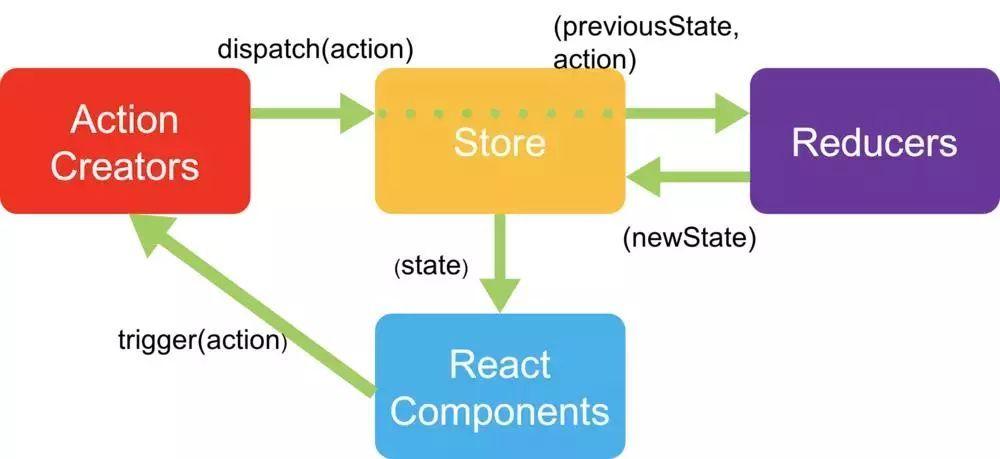
redux

安装redux

npm install --save redux

redux基础

1
2
3
4
5
6
7
8
9
10
11
12
13
14
15
16
17
18
19
20
21
22
23
24
25
26
27
28
29
30
31
import { createStore } from 'redux'

// 这就是reducer处理函数,参数是状态和新的action
function counter(state=0, action) {
// let state = state||0
switch (action.type) {
case '加机关枪':
return state + 1
case '减机关枪':
return state - 1
default:
return 10
}
}
// 新建保险箱
const store = createStore(counter)
// console.log
const init = store.getState()
console.log(`一开始有机枪${init}把`)
function listener(){
const current = store.getState()
console.log(`现在有机枪${current}把`)
}
// 订阅,每次state修改,都会执行listener
store.subscribe(listener)
// 提交状态变更的申请
store.dispatch({ type: '加机关枪' })
store.dispatch({ type: '减机关枪' })

解决异步redux-trunk

安装redux-trunk

npm install --save redux-trunk

1
2
3
4
5
6
7
8
9
10
11
12
13
14
15
16
17
18
19
20
21
22
23
24
25
26
27
28
29
30
31
const ADD_GUN = '加1'
const REMOVE_GUN = '减1'
// 这就是reducer处理函数,参数是状态和新的action
export function counter(state=0, action) {
// let state = state||0
switch (action.type) {
case ADD_GUN:
return state + 1
case REMOVE_GUN:
return state - 1
default:
return 10
}
}
export function addGun(){
return { type: ADD_GUN }
}
export function removeGun(){
return { type: REMOVE_GUN }
}
// 延迟添加,拖两天再给
export function addGunAsync(){
// thunk插件的作用,这里可以返回函数,
return dispatch => {
setTimeout(() => {
// 异步结束后,手动执行dispatch
dispatch(addGun());
}, 2000);
};

}

react-redux

安装redux-redux

npm install --save redux-redux
index.js

1
2
3
4
5
6
7
8
9
10
11
12
13
14
15
16
17
18
import ReactDOM from 'react-dom'
import { createStore, applyMiddleware, compose} from 'redux'
import thunk from 'redux-thunk'
import { counter } from './index.redux'
import { Provider } from 'react-redux';
import App from './App'

const store = createStore(counter, compose(
applyMiddleware(thunk),
window.devToolsExtension ? window.devToolsExtension() : f => f
))
ReactDOM.render(
(
<Provider store={store}>
<App />
</Provider>
),
document.getElementById('root'))

App.js

1
2
3
4
5
6
7
8
9
10
11
12
13
14
15
16
17
18
19
20
21
22
23
24
25
26
27
28
import { connect } from 'react-redux'
import { addGun, removeGun, addGunAsync } from './index.redux'

class App extends React.Component{
render(){
// num addGun,removeGun,addGunAsync都是connect给的,不需要手动dispatch
return (
<div>
<h2>现在有机枪{this.props.num}把</h2>
<button onClick={this.props.addGun}>申请武器</button>
<button onClick={this.props.removeGun}>上交武器</button>
<button onClick={this.props.addGunAsync}>拖两天再给</button>
</div>
)
}
}

const mapStatetoProps = (state) => {
return {
num: state
}
}

const actionCreators = { addGun, removeGun, addGunAsync }

App = connect(mapStatetoProps, actionCreators)(App)

export default App;

装饰器模式

webpack配置

npm install babel-plugin-transform-decorators-legacy --save-dev

.babelrc配置

1
2
3
{
"plugins": ["transform-decorators-legacy"]
}

App.js

1
2
3
4
5
6
7
8
9
10
11
12
13
14
15
16
17
18
19
20
21
22
import { connect } from 'react-redux'
import { addGun, removeGun, addGunAsync } from './index.redux'

// 装饰器模式
@connect(
state=>({ num: state}),
{addGun, removeGun, addGunAsync}
)
class App extends React.Component{
render(){
// num addGun,removeGun,addGunAsync都是connect给的,不需要手动dispatch
return (
<div>
<h2>现在有机枪{this.props.num}把</h2>
<button onClick={this.props.addGun}>申请武器</button>
<button onClick={this.props.removeGun}>上交武器</button>
<button onClick={this.props.addGunAsync}>拖两天再给</button>
</div>
)
}
}
export default App;